Linking to the Locations database
The Locations database is a separate database in Calm which allows you to create a hierarchical index of your storage locations. Locations records are then linked to the records in the catalogue database, to document which objects are stored in which locations.
The locations records are created in the Location database in Calm.
Once you have created some location records you can link your catalogue records to them. Catalogue records may be linked to locations in two ways:
- Current Location: for temporary locations such as temporary exhibition spaces or museum offices
- Normal Location: for permanent locations such as storage locations
The Locations facility will keep a record of any new locations and changes of location and will build up a database of Movement history for every catalogue record.
Catalogue records may be linked to location records either one at a time, or by hit list. To link catalogue records to a location record, first ensure that the current record or the current hit list is the one you wish to link, then:
- Click the
 or
or  button in the button strip
 - A search dialogue box will appear, search for the location you wish to link to
- If you retrieve more than one match, the resulting hit list is displayed in an overview. Click the correct record in the overview to select it and click OK in the dialogue box that has moved to the bottom right corner of the screen
- When you have selected one record you will be asked to confirm that it is the correct record. Choose “Yes” if so, or “No” to search again
- When you click Yes to link a location, the Reasons for Move dialogue box appears (the Reason for Move dialogue box will be displayed even if this is the first time you have linked a location record to the catalogue record), as below:
- Complete the box as follows (any data you enter here will be stored on the movement record for this move in the movement database):
- If you are moving one item, tick 'this record only' and if you are moving a hitlist of items, tick 'the entire hit list'.
- Click OK, The record you selected will be linked to your catalogue record(s).
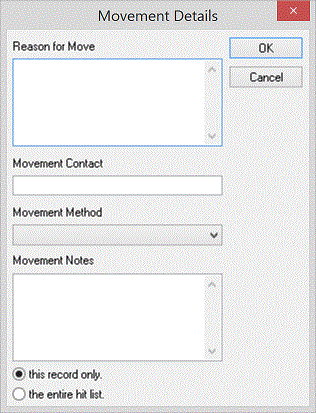
Reason for Move: Type the reason for the move such as “Display”, “Photographing” etc. If there has been no move and this is the permanent location, type this here.
Movement Contact: Type the name of the person in charge of the move
Movement Method: The MovementMethod field in the Movement record is a picklist field and the default picklist options are Handcarried, Loan Out and Trolley. Record the MovementMethod here using a term from the picklist. Picklists may be customised, removed or added using the Picklist facility in the Admin program.
Reference Number: Record any reference number for the move such as an exhibition number, if appropriate
Movement Notes: Record any general information about the move
As part of the process of linking the two records, Calm copes the LocationReference field from the Location record into the NormalLocation or CurrentLocation field on the Catalogue record. This is how the link between the two records is maintained. Details of the Location record are shown as a “linked record” at the bottom of your catalogue record(s).
You may use the navigational tab for NormalLocation
or CurrentLocation to browse to the linked record. You may then use the
 button in the button strip to return to your previous hitlist in the catalogue
database. Alternatively you may use the
navigational tabs in the Locations
database record to browse for all the Catalogue records which have been linked
to the Location record.
button in the button strip to return to your previous hitlist in the catalogue
database. Alternatively you may use the
navigational tabs in the Locations
database record to browse for all the Catalogue records which have been linked
to the Location record.
Changing the Location
With the relevant Catalogue record or hit list on screen, repeat the above process for linking to a location. Calm will change the location and keep a record of the former location in the Movement history database.
Movement History
Once you have linked a catalogue record to a NormalLocation or CurrentLocation you may use the Movement navigational tab at the top of the record to view the movement history of the object in question. Each time a location is added or changed Calm will create a movement record in the Movement history database. If there are several movement records linked to a catalogue record you will be able to browse through them all to see a complete movement history for your object.