Completing Fields in Catalogue Records
There are a number of different Field Types in Calm and the type of field will affect the way that data is entered. If certain fields are completed incorrectly you will receive an error message, providing that the Validation Options have been set. The Complete Field List gives precise details for all the fields in the Catalogue database.
Mandatory Fields
In the Catalogue records certain fields are mandatory and must be completed for Calm to work properly. Other fields are optional and may be left blank if required. The mandatory field on Museum Catalogue records is ObjectName:
ObjectNumber: This is an alphanumeric field which you should complete with a unique number or combination of letters and numbers. The ObjectNumber acts as a unique identifier for the Museum catalogue records. The ObjectNumber field is also a tree field and may be used to create a tree hierarchy of museum catalogue records. The ObjectNumber field uses a “.”(full stop) to indicate the different levels. For instance, you may have an ObjectCollection record about a collection of paintings by John Smith; this record may have an ObjectNumber of JS. You can then subdivide this collection into Object records about individual paintings by giving these sections ObjectNumbers of JS.1, JS.2, and so on, as below:
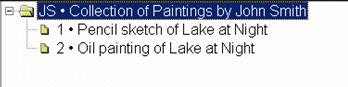
The tree structure is displayed by pressing the
 button
on the button strip, followed by the
button
on the button strip, followed by the
 button. This shows
clearly the various levels and how different records are linked together.
button. This shows
clearly the various levels and how different records are linked together.
ObjectName: ObjectName is a text field into which you should type a short name for the object or objects you are cataloguing. More detail may be entered in the BriefDescription field. ObjectName is an Authority Field which takes its authority from the Object Name database.
Other Important Fields
Repository: When you first use Calm you may find that the Repository field has been given a sample Default Content. The default content may be altered (for example to the name of your institution) or removed using the Default Content facility in the Admin program. The repository field is also a Picklist Field, it has been given a sample pick list which may be altered or removed using the Pick list facility in the Admin program.
ObjectProductionDate: The ObjectProductionDate field in the catalogue database is a Period Date field. Dates must be entered in a valid format to ensure that when searching the ObjectProductionDate field, the date parser can interpret the date properly. A warning message will appear if you save a record containing an invalid date.
Accession Number: The Accession Number field is used for your unique Object Accession numbers. These may be the same number as the ObjectNumber, if appropriate, or a different numbering system if required.
RCN: Record Condition Number. The RCN field is normally a hidden field but may be viewed by pressing F9 on your keyboard. It is a Serial Number Field which is automatically completed by Calm when a new Catalogue record is created. Calm uses the RCN to uniquely identify catalogue records and to link them to records in the Conservation database and to condition records when required. The serial number which appears in this field may be customised using the Serial Number facility in the Admin program.
ObjectNameType, AcquisitionMethod, Completeness, Condition, ConservationStatus and ConservationPriority: These fields are all Pick list fields. By default they have been set as “pop-up” pick lists, therefore to view the list you may double-click within the field or start typing in the field to make the list appear. The pick lists can be customised, removed or changed to “drop-down” style lists using the Pick list facility in the Admin program.
BarCode: If you are using a barcode scanning app such as Axiell Move to work with objects, for example by assigning or changing their locations, you will need a field the scanner can use to identify the object and connect it to a barcode. This field is meant to hold a barcode's unique identifying number. If you are not using a barcode scanning app, this field can be safely ignored.