Adding an Entry Record to the Catalogue database
Once the Entry record is complete you can "Add" the entry to the Catalogue. Calm will create a new catalogue record, or records, linked to your Entry record. Please note that a Location can then be attached to the Catalogue record if required. To add your Entry record to the catalogue, make sure that the record you want to add is the current record then:
- Click the
 button in the side button strip
 - The Select Record Type dialogue box appears. Use the drop down menu to select the record type that you wish to use in the catalogue database.
- Click on the record type you require and click OK.
If you are creating more than one catalogue record and wish to use the same Record Type for all the records, the tick box on this dialogue box can be used to choose the record type for every record you are creating. For example:
If you typed "3" into the NumberofObjects field on the entry record, Calm will create 3 catalogue records at this stage. If you want all three to be of the Object record type, select the Object and tick "All Remaining records of this type".
All three new catalogue records will then be created using the Object Record Type.
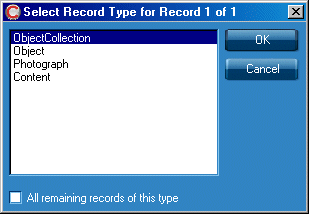
You will normally choose either Object (for single objects) or Object Collection (for groups of objects). The record types shown as options here will be those which have been classified as being Museum Catalogue record types.
Calm will create catalogue records according to the number you entered in the Number of Objects field on your Entry record. You will be asked to choose a record type for each catalogue record being created.
You will be returned to the Entry Record; note that the Add Objects field has been completed with today’s date.
Your original Entry record remains in the Accessions database but has now been linked to the new Catalogue record or records using the Entry Number field. Before proceeding to the catalogue database you may wish to complete the Accessioned Field as detailed below:
The Accessioned Field
If you wish, you may now complete the Accessioned field at the top of the record. the Accessioned field is a pick list field with a simple yes/no picklist. You may wish to choose "Yes" from the drop down menu to confirm that you are officially accessioning the object into your collection.
You may now use the Catalogue tab at the top of the record to move to the Catalogue database and view the new catalogue record/s which you have created. The new catalogue record/s have the Entry number from the Entry record copied into them; this has created a link between the Entry and Catalogue records.